On-Call & Office Hours PlaybookOffice Hours Hold + After-Hours Auto-Dispatch
How to Set Up an After-Hours, Weekend & Holiday Maintenance Schedule (Without PM Burnout)
The #1 reason great property managers and maintenance coordinators quit is weekend and 2:00 AM on-call burnout. Here is the exact playbook for separating Daytime Office Hours (manager review) from After-Hours, Weekends, and Holidays (autonomous vendor dispatch).
1. Open Office Hours (e.g., Mon–Fri, 8:00 AM – 5:00 PM)
During business hours, you want full visibility before a contractor rolls a truck:
- Kathy answers daytime maintenance calls on the first ring and texts the tenant a 1-tap camera link for photos
- PropDispatch matches the property, unit/suite, trade category, and priority, and pre-selects your recommended Primary & Backup vendors
- Work orders are held in "Awaiting Manager Review" so your coordinator can check rent status, owner funds, or request 3 vendor quotes first
2. After-Hours, Weekends & Closed Holidays (5:00 PM – 8:00 AM + Sat/Sun)
At 5:00 PM sharp (and all day on weekends, 14 US Federal Holidays, and your custom company closed dates), the system switches automatically:
- True P1 Emergencies auto-dispatch immediately to your Primary Vendor via SMS magic link once the tenant uploads a photo
- If your Primary Vendor declines or misses their 30-minute timer, PropDispatch automatically escalates to your Backup Vendor
- Your Fallback Management Contacts are only alerted if BOTH Primary and Backup vendors fail to respond
- Routine P3 requests called in at midnight are captured with photos and held quietly until 8:00 AM
3. Hybrid In-House Techs (Weekdays) + External Contractors (Nights/Weekends)
Give your salaried maintenance techs their nights and weekends back without paying overtime:
- Set salaried maintenance employees as "In-House Staff (No Invoice Required)" for 1-click daytime closing
- Assign external 24/7 licensed plumbers, HVAC techs, and roofers for after-hours P1 escalation with automated Zero-Chase invoice collection
Never Remember to Flip an On-Call Switch on Friday at 5:00 PM Again
In PropDispatch, you configure your Open Days, Hours, Timezone, US Federal Holidays, and Custom Closed Dates once in Settings > Company Profile. Your phone line automatically switches between daytime hold and after-hours auto-dispatch forever.
Frequently Asked Questions
What if our office closes early for a company retreat or local holiday?
Simply add the date under Custom Closed Dates in Settings > Company Profile (or on the Routing Rules page), and PropDispatch will automatically run your after-hours auto-dispatch rules all day on that date.
Battle-Tested in Real Emergencies
When a Hurricane Hit, PropDispatch Handled Every Emergency.
Real unscripted tenant calls, real SMS damage photos, and real autonomous vendor dispatches from a 500+ unit portfolio during a regional hurricane surge—with zero busy signals and zero mobile apps required.
🚨 P1 Emergency🛠️ Trade: Structural / Tree & Roof
Massive Fallen Tree Punches Hole Through Roof & Interior Ceiling
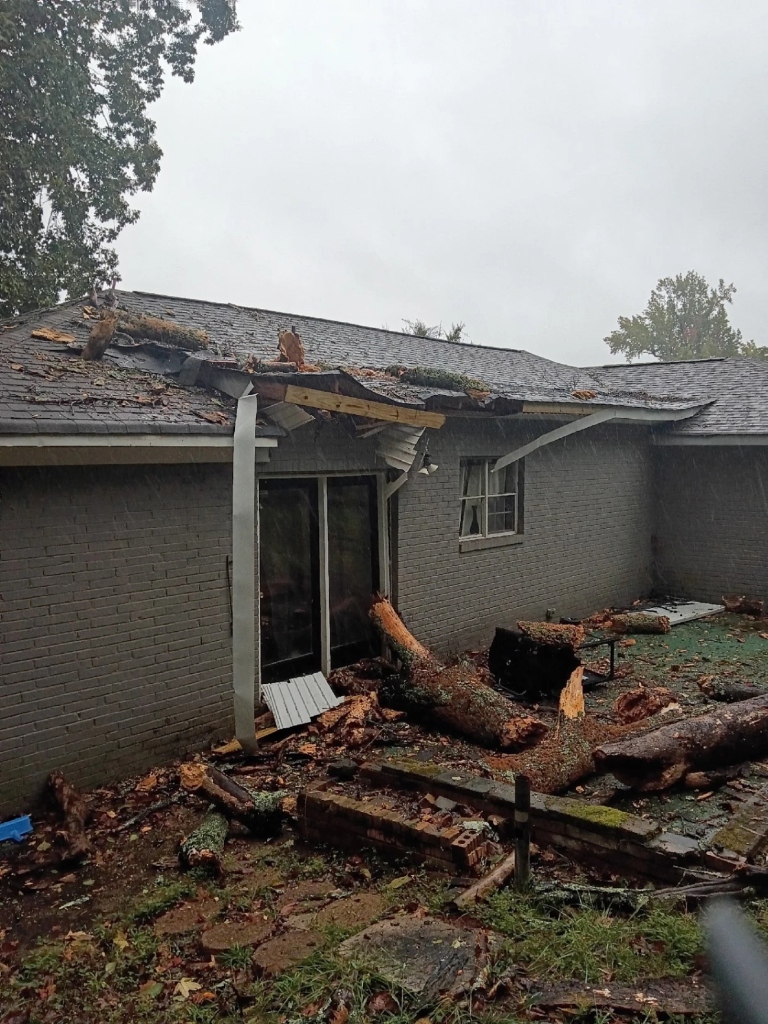
TENANT SMS PHOTO #1: EXTERIOR
Enlarge
Massive hurricane-downed tree limbs crushed across the brick home’s roof overhang and patio.
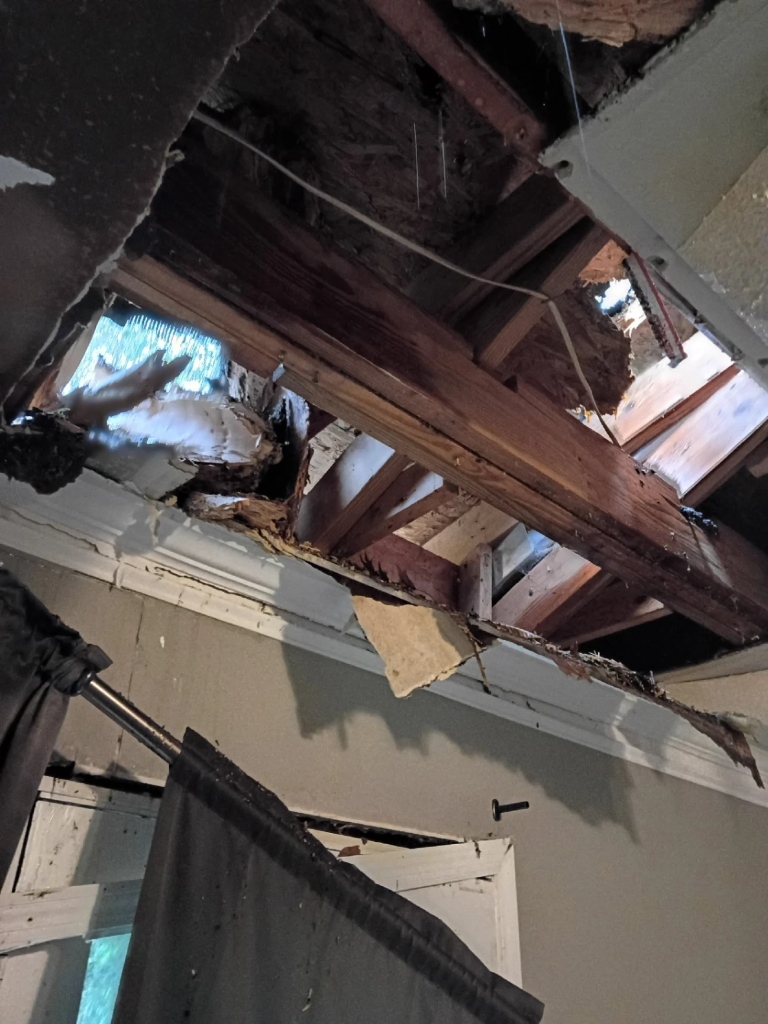
TENANT SMS PHOTO #2: INTERIOR
Enlarge
Hole punched through the interior ceiling exposing wooden rafters, insulation, and daylight.
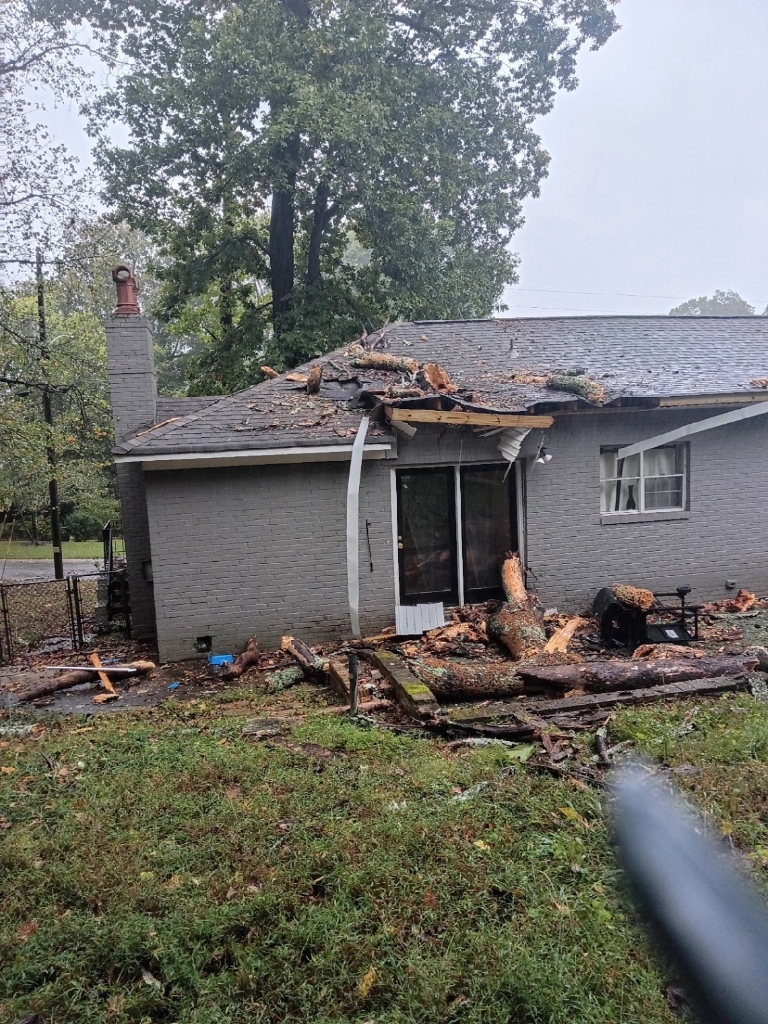
TENANT SMS PHOTO #3: WIDE VIEW
Enlarge
Wide exterior view showing the fallen oak tree across the roof, crushed gutter, and debris.
Autonomous Resolution: When a huge oak tree crashed onto a brick home during the hurricane, Kathy calmly asked follow-up questions to uncover that the tree had punched a hole right through the interior ceiling and damaged the tenant’s belongings—then immediately texted a photo upload link and dispatched emergency crews.
AI Answered
SMS Photo
Vendor Dispatched
Invoiced
Play Real Call Recording (1:04)0:00 / 1:04
* Privacy Note: Company names, tenant names, phone numbers & street addresses are intentionally replaced with a gentle chime (🔔) for privacy.
Full Call Transcript (Unscripted)
[AI Dispatcher — Kathy]:Hi, this is Kathy with 🔔 Redacted for Privacy. For medical or fire emergencies, call 911. Otherwise, please describe your maintenance issue. Por favor, describa su problema de mantenimiento.
[Tenant]:The tree fell on my house.
[AI Dispatcher — Kathy]:Is there any other damage related to the fallen tree?
[Tenant]:Yes, it has put a hole on the inside of the home. And it damaged all my stuff that I had here.
[AI Dispatcher — Kathy]:Please provide your full name.
[Tenant]:🔔 Redacted for Privacy
[AI Dispatcher — Kathy]:I have your number as 🔔 Redacted for Privacy. Is that a good number to text you at?
[Tenant]:Yes.
[AI Dispatcher — Kathy]:Please tell me your full property address and your unit number if you have one.
[Tenant]:🔔 Redacted for Privacy
[AI Dispatcher — Kathy]:Please let me know if there are any pets on the property.
[Tenant]:No. No pets.
[AI Dispatcher — Kathy]:One moment, please... Your ticket is created. Please upload photos using the link I just texted you, and a vendor will be in touch shortly. Thank you. Goodbye.
PMS Integrations & Comparisons
Free Checklists & Property Types
- Emergency vs. Routine Maintenance Checklist
- Section 8 (HQS / NSPIRE) Inspection Checklist
- Vacant Unit Rent-Ready Turnover Checklist
- After-Hours On-Call Schedule Template
- Multi-Family Apartment Complexes
- Commercial Plazas & Office Buildings (Suite/Bay)
- Off-Campus Student Housing & Turn Week
- Airbnb, Vrbo & Vacation Rentals
Popular Maintenance Guides
- Case Study: 1st Choice Properties (2 Platforms → 1)
- Answering Service Cost: $1.25/Door vs. $2/Min Call Centers
- Section 8 (P4), Rent Ready (P5) & HOA Priority Queues
- Multi-Vendor SMS Estimates & Zero-Chase Invoicing
- Case Study: 500+ Unit Hurricane Surge Dispatch
- 24/7 Answering Service ROI Calculator →
- Transparent $1.25/Door Flat Pricing →
Featured US Property Management Markets We Serve 24/7
View All 220+ US Cities →Ready to stop losing sleep?
Join property managers who have eliminated after-hours chaos. Your AI dispatcher is ready in minutes—not months.
✨ Try the full experience: Call (888) 720-7190 ext. 0000 to experience our AI voice, SMS photo uploads, tenant scheduling, and automated invoicing.
Paid customers get a dedicated local phone number (no extensions required).